
- 1Go to the Plugins section and click 'Install Plugins' in the top right hand of the page.
-
2Type in 'WP-O-Matic' in the search box, and click Install on the right hand side of the description. Click on the red 'Install Now' button on the right hand side.
-
3After the installation you should receive a message stating the installation was successful. Once you see this click 'Activate Plugin'.
-
4Now head further down the Settings list on the left hand side of the navigation menu to WP-O-Matic. For now just click next for the next four screens without paying attention until you are at the WP-O-Matic dashboard.
-
5Once you are on the dashboard menu click on 'Add Campaign'.
-
6Under the basic tab you are asked to include a title. It doesn’t matter what you choose but something like 'Hypnosis RSS' would be appropriate if you were running a hypnosis site. Once you have done this click on the Feeds tab.
-
7You will be now asked to add a number of Feed URLs.
-
8On the Feed URLs page in Wordpress you can also change the Frequency from 1d 5h 0 to 0d 0h 5m and then click Submit.
-
9While still on the WP-O-Matic dashboard click the Options link on the left hand side. You might see a red warning box but it is nothing to worry about. Copy the web address underneath the WebCron-ready URL.
-
10With this address copied you need to go back to your websites control panel. This can be found using the following address with your relevant login details. www.YOURWEBSITE.com/cpanel
-
11Scroll right to the bottom and under the Advanced Box is the Cron jobs option, and click this.
-
12You will then be asked your experience level. Choose Standard. Once in the Cron Manager you will see a box where you are asked to enter an email address. I would not recommend doing it, as you will receive an email every time a cron job runs.
- Underneath is Entry 1. In the box to the right of Command to run is an empty box. Here is the box where you need to paste the Webcron-ready URL you copied earlier. When you have done this, click on the box and type in the word 'curl' and then leave a space between curl and your Webcron-ready URL.
-
13Set the timing of Entry 1 to those that you see above. This means that the cron will check the RSS feeds every five minutes every day for the latest content. Click 'Save Crontab
Sunday, 27 April 2014
Make an Autoblog with Wordpress


Keyword Research
Ask yourself...
Is the keyword relevant to your website's content? Will searchers find what they are looking for on your site when they search using these keywords? Will they be happy with what they find? Will this traffic result in financial rewards or other organizational goals? If the answer to all of these questions is a clear "Yes!", proceed...
Search for the term/phrase in the major engines
Understanding which websites already rank for your keyword gives you valuable insight into the competition, and also how hard it will be to rank for the given term. Are there search advertisements running along the top and right-hand side of the organic results? Typically, many search ads means a high value keyword, and multiple search ads above the organic results often means a highly lucrative and directly conversion-prone keyword.
Buy a sample campaign for the keyword at Google AdWords and/or Bing Adcenter
If your website doesn't rank for the keyword, you can nonetheless buy "test" traffic to see how well it converts. InGoogle Adwords, choose "exact match" and point the traffic to the relevant page on your website. Track impressions and conversion rate over the course of at least 2-300 clicks.
Using the data you’ve collected, determine the exact value of each keyword.
For example, if your search ad generated 5,000 impressions, of which 100 visitors have come to your site and 3 have converted for total profit (not revenue!) of $300, then a single visitor for that keyword is worth $3 to your business. Those 5,000 impressions in 24 hours could generate a click-through rate of between 18-36% with a #1 ranking (see the Slingshot SEO study for more on potential click-through rates), which would mean 900-1800 visits per day, at $3 each, or between 1-2 million dollars per year. No wonder businesses love search marketing!
|
Going back to our online shoe store example, it would be great to rank #1 for the keyword "shoes" - or would it?
It's wonderful to deal with keywords that have 5,000 searches a day, or even 500 searches a day, but in reality, these "popular" search terms actually make up less than 30% of the searches performed on the web. The remaining 70% lie in what's called the "long tail" of search. The long tail contains hundreds of millions of unique searches that might be conducted a few times in any given day, but, when taken together, they comprise the majority of the world's demand for information through search engines.
Another lesson search marketers have learned is that long tail keywords often convert better, because they catch people later in the buying/conversion cycle. A person searching for "shoes" is probably browsing, and not ready to buy. On the other hand, someone searching for "best price on Air Jordan size 12" practically has their wallet out!
Understanding the search demand curve is critical. To the right we've included a sample keyword demand curve, illustrating the small number of queries sending larger amounts of traffic alongside the volume of less-searched terms and phrases that bring the bulk of our search referrals.


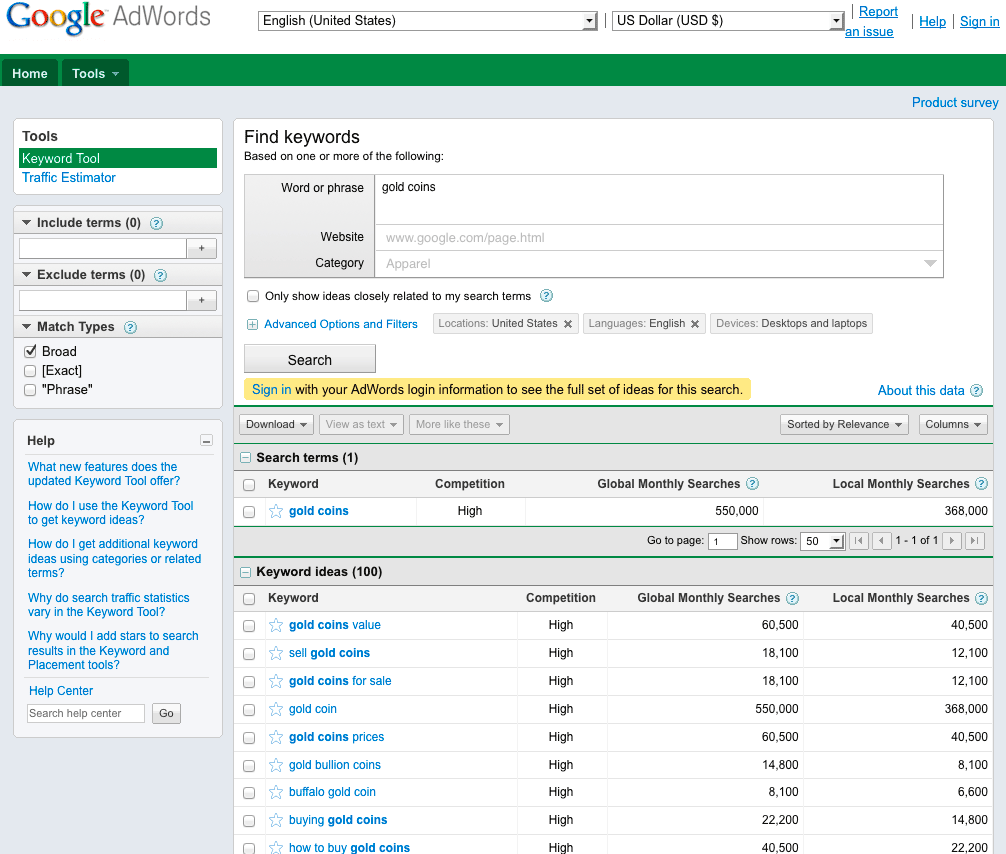
Google’s AdWords Keyword Tool provides suggested keyword and volume data.
Resources
Where do we get all of this knowledge about keyword demand and keyword referrals? From research sources like these listed here:
- Google Adwords’ Keyword Tool
- Google Insights for Search
- Google Trends Keyword Demand Prediction
- Microsoft Advertising Intelligence
- Wordtracker’s Free Basic Keyword Demand
Google's AdWords Keyword tool is a common starting point for SEO keyword research. It not only suggests keywords and provides estimated search volume, but also predicts the cost of running paid campaigns for these terms. To determine volume for a particular keyword, be sure to set the Match Type to [Exact] and look under Local Monthly Searches. Remember that these represent total searches. Depending on your ranking and click-through rate, the actual number of visitors you achieve for these keywords will usually be much lower.
Other sources for keyword information exist, as do tools with more advanced data. The Moz blog category on Keyword Research is an excellent place to start.
What are my chances of success?
In order to know which keywords to target, it's essential to not only understand the demand for a given term or phrase, but also thework required to achieve those rankings. If big brands take the top 10 results and you're just starting out on the web, the uphill battle for rankings can take years of effort. This is why it's essential to understand keyword difficulty.Different tools around the web help provide this information. One of these, Moz’s own Keyword Analysis Tool does a good job collecting all of these metrics and providing a comparative score for any given search term or phrase.
Thursday, 24 April 2014
How to Setup Google DFP for Selling Ads
DFP stands for DOUBLE CLICK FOR PUBLISHERS which helps you sell direct ads more effectively. This step by step guide will help you to get started with DFP.

Consider the following point which makes you come here :-
You use some ads showing networks like Google Adsense, Infolinks etc for serving ads, but you also like to recive direct ads from brands, agencies and other Direct advertisers.You have partnered with multiple CPM ads agencies like Buysellads, Google Adsense, Tribal Fusion but would only like to show those ads which will pay you more.You are using AdSense ads but with low CPM instead of that you want to show in house ads which will show your thinks or your ads, post , images etc.You like to show ads based on some criteria like ads to the Visitors of India will be shown one set of ads while to U.S visitors you will show others ads etc.Google DFP is the perfect solution for any of the above scenario. DFP is a free ad server which help you sell your ad space more effectively and help you maximizing the revenue you generate.
With the Help of DFP you can run any type of Ads like banner ads, text ads, flash ads, video ads etc.It requires only one tool Google Ad Manager which need not required any installation just it need is an Active Google AdSense account.

We had to tell DFP all the ads space we are providing on our webpage. For this we would take the example of most popular blog Digital Inspiration own by Amit agarwal. He has created an ads of size 350 x 250 rectangle. This is standard size but you can choose your own custom.
Go to DFP > Inventory > Ad units> New ad Units. Give a description which will help you identify it next time.You may check the option of Maximize revenue of unsold and remnant inventory with AdSense. in case when Google offers more revenue when there is no direct ads to show.


Read More

Consider the following point which makes you come here :-
You use some ads showing networks like Google Adsense, Infolinks etc for serving ads, but you also like to recive direct ads from brands, agencies and other Direct advertisers.You have partnered with multiple CPM ads agencies like Buysellads, Google Adsense, Tribal Fusion but would only like to show those ads which will pay you more.You are using AdSense ads but with low CPM instead of that you want to show in house ads which will show your thinks or your ads, post , images etc.You like to show ads based on some criteria like ads to the Visitors of India will be shown one set of ads while to U.S visitors you will show others ads etc.Google DFP is the perfect solution for any of the above scenario. DFP is a free ad server which help you sell your ad space more effectively and help you maximizing the revenue you generate.
With the Help of DFP you can run any type of Ads like banner ads, text ads, flash ads, video ads etc.It requires only one tool Google Ad Manager which need not required any installation just it need is an Active Google AdSense account.
How To Sell Your Advertising Space With DFP ?
Follow this simple step by step guide :-
1. Create Ad units

Go to DFP > Inventory > Ad units> New ad Units. Give a description which will help you identify it next time.You may check the option of Maximize revenue of unsold and remnant inventory with AdSense. in case when Google offers more revenue when there is no direct ads to show.
Note :- Google adsense doesn't allow to open ads in new window but if you are using DFP then you can allow to open Google ads in new window.
2. Define Placement

If you have more than one ads in your web or blog then advertiser may want to show one or more ad units You can group this ads space with defining the placement of these ads that can be targeted by Advertisers.
Go to Inventory Tab > Placement > New Placements and add your ad space placement. Now check the option "Offer this Placement to Advertisers" through adwords to attract more advertisers. You have to carefully fill the Adsense section because whatever you fill it will be visible to Advertisers.
3. Create An Order

Now as you have created an Ad inventory now its time to get orders. The advertiser will specify where he wants to place the ads, what kind of ads and what will he pay for it.
Go to DFP > Order > New Order. Create a company for advertiser and fill order details under " New Line Items" Set the type Price priority if you want to show only highest paying ads to the visitors and then add targeting criteria.
4. Upload Ad Creative

Now upload the ad creative to your blog or web to be displayed. You can upload a image saying advertise here.
Go to DFP > Line items and select "line items" that you have created in previous steps. Click on ad creative or either upload a image or an text ad like you see that Google Adsense.
5. Get The Add Tags To your Website
Click inventory tab in DFP dashboard and choose "generate tags" select the ad unit you have created and then click on generate tags. Use Google Publisher Tags option from drop down menu and ad this code to your website Google DFP will begin showing this ads in 15 to 20 minutes.
How To Download Torrent Files with IDM-New Trick
1.First go to Zbigz.com
2.Signup for a free account there
3.After the signup torrent search engine and search for the file which you want to download with idm.
4.Now download the torrent file.
2.Signup for a free account there
3.After the signup torrent search engine and search for the file which you want to download with idm.
4.Now download the torrent file.
5.Now go to Zbigz.com

6.Click upload and choose the file that you have downloaded


8.Now your torrent file will be downloaded and leeched and your file will be available to download(If its a large file then wait for few minutes).

9.Now click download and select free

10.ALL DONE ,Now download will be ready

and you can download torrent files with idm.

Monday, 21 April 2014
Links for SEO
link building
The most important part of any SEO campaign is getting more links to point to your site. Links really are the measure of power on the internet, as a site with bad content but a lot of links will outrank a beautiful, relevant, site with great content but no links...everytime.
So, you know you want links, but what's the best way to go about getting them?
- Get links from sites in your industry
- Have links point to deep URLs on your site
- Don't do it all at once; do it over time
- Consider paid links and organic links
get links from related sites
When building your site's authority on the web, you should always be striving to get links from sites that are in the same industry as you. Google tends to give more weight to links that are in the same industry, especially when the link is from a site that Google views as an authority (a Pagerank over 6).
Don't worry about only getting links from sites that are in your vertical, but if you have a choice between a link from a general blog and a blog that specializes in your industry, always go with the industry related site first!
get deep links
When acquiring links from other sites, don't just have the link point to your homepage (http://www.example.com). Instead have them point to the content pages that you would like to have rank better in the search engines. By getting a link that points directly to a content page, you are showing the engines:
- This site contains useful content
- This exact content page is seen as important by someone else on the internet
The more links you get pointing to a specific content page, the more the search engines are going to believe that the content page is something special and should be ranked at the top of the results.
pace yourself!
Although any link is a good link, getting 10,000 links in a week is not as beneficial as getting 10,000 links over the span of 6 months. When a site suddenly gets a ton of links, this throws up a red flag at the search engines that the site may be trying to cheat its way to the top. There are exceptions, but it is best to take a long-term approach when acquiring links for your site, especially if your site is less than two years old (another red flag).
Have a plan of how many links you want to get and then work on that plan a few hours a week for several months. This way you can show the search engines that your site is gradually growing in popularity and is regularly receiving new backlinks (the best indicator of a good site!).
consider paid links
Getting someone to link to you for free can sometimes be hard, especially if you're in a competitive industry where people have so many other choices of sites to link to. If this is the case, you may consider buying a certain amount of links every month. To read more on this, check out our paid links lesson to see the latest ways to go about this.
Verifying a website
You design and develop a web site but how would you know if you have put all the HTML syntax in correct way. Almost all browser don't complain against your wrong syntax but wrong is wrong. There are many SEO experts who claim that SEO is not dependent on site HTML/XHTML verification. But I will tell you various reasons why your site should be W3C Compliance.
Why HTML/XHTML Verification is Required?
There are various reasons to verify your web page before hosting it over the internet.
- Any web page quality depends on how well you have written your web page.It should be syntactically correct and should pass all the Quality Gates.
- When any Search Engine does indexing for your web page content it might get confused if your HTML tags are not written properly and much of the web page content might not be indexed properly.
- There might be many HTML tags which you are using in your web page but then have been depreciated and many of the search engines also don't support them.
- Consistency, HTML Code Beauty, Process Compliance are always appreciated by good Webmasters.
What Is W3C Compliance?
The W3C is the World Wide Web Consortium and since 1994 the W3C has provided the guidelines by which websites and web pages should be structured and created. Here are the links to validate your web pages:
- Validate HTML/XHTML File against W3C Standard HTML/XHTML Validator.
- Validate CSS File against W3C Standard CSS Validator.
While doing verification you will get errors along with appropriate reasons. All the validations will be done using XHTML DTD which is a refined version of HTML.
Rules for W3C Compliance:
There are following rules which you should keep in your mind while writing your web pages.
- Use the XHTML declaration statements to start every XHTML page:
<!DOCTYPE html PUBLIC "-//W3C//DTD XHTML 1.0 Strict//EN" "DTD/xhtml1-strict.dtd"> - Every tag must be closed.
- The head and body tags are now mandatory.
- Empty tags get a terminating slash. An empty tag is a tag that doesn't require an end tag. Examples include <br> and <hr>.
<BR> is now <br />.
<HR> is now <hr />.
<IMG SRC="--"> is now <img src="--" />
- All tags must be lower case. This does not apply to attributes, only tags. For example, both of these formats are acceptable under the XHTML DTD:
<FONT color="#ffffcc"> is invalid
<font color="#ffffcc"> is valid
<font color="#FFFFCC"> is also valid
- All the attribute values should be put with-in double quote.
- Tags may not nested
<b><i>Text</b></i> This is invalid
<b><i>Text</i></b> This is valid
- The <pre> tag should not contain: img, object, big, small, sub, or sup.
- One <form> tag can not be inside another <form> tag.
- If your code contains a &, it must be written as &.
- Any use of CSS should use all lower case lettering.
Keywords
We are discussing everything in Web context so in web terminology a keyword is a term that a person enters into a search engine to find specific information. Most people enter search phrases that consists of between two and five words. Such phrases may be called search phrases, keyword phrases, query phrases, or just keywords. Good keyword phrases are specific and descriptive.
There are following concepts related to Keywords which helps in optimizing keywords on a web page.
Keyword Frequency:
This is calculated as how often does a keyword appear in a site's title or description. You don't want to go overboard with frequency, however, since on some engines if you repeat a word too many times, you'll be penalized for "spamming" or keyword stuffing.
In general though, repeat your keyword in the document as many times as you can get away with, and up to 3-7 times in your META tags.
Keyword Weight:
This refers to the number of keywords appearing on your Web page compared to the total number of words appearing on that same page. Some search engines consider this when determining the rank of your Web site for a particular keyword search.
One technique that often works well is to create some smaller pages, generally just a paragraph long, which emphasize a particular keyword. By keeping the overall number of words to a minimum, you will increase the "weight" of the keyword you are emphasizing.
Keyword Proximity:
This refers to the placement of keywords on a Web page in relation to each other or, in some cases, in relation to other words with a similar meaning as the queried keyword.
For search engines that grade a keyword match by keyword proximity, the connected phrase .home loans. will outrank a citation that mentions .home mortgage loans. assuming that you are searching only for the phrase "home loans".
Keyword Prominence:
A measure of how early or high up on a page the keywords are found. Having keywords in the first heading and in the first paragraph (first 20 words or so) on a page are best.
Keyword Placement:
WHERE your keywords are placed on a page is very important. For example, in most engines, placing the keywords in the Title of the page or in the Heading tags will give it more relevancy. On some engines, placing keywords in the link text, the part that is underlined on the screen in a browser, can add more relevancy to those words.
Best Places to Put Keywords:
Here is a list of places where you should try to use your main keywords.
- Keywords in the <title> tag(s).
- Keywords in the <meta name="description">
- Keywords in the <meta name="keyword">
- Keywords in <h1> or other headline tags.
- Keywords in the <a href="http://yourcompany.com">keywords</a> link tags.
- Keywords in the body copy.
- Keywords in alt tags.
- Keywords in <!-- insert comments here> comments tags.
- Keywords contained in the URL or site address, e.g., http://www.keyword.com/keywordkeyword.htm.
Finding Keywords:
There are many different ways to find keywords for your website. Some good keyword ideas are:
- Words people would search for to find your product or service.
- Problems your prospective customers may be trying to solve with your product or service.
- Keyword tags on competitors websites.
- Visible page copy on competitors websites.
- Related search suggestions on top search engines.
- By using an online tools like: Google Keyword Tool
- By analyzing your website carefully and finding out proper keywords. This task can be done by expert SEO Copywriters.
- Pay attention to stemming for your keywords - Particularly to what the root word is and what Google considers to be a match for that word when optimizing pages over time.
- You can do brainstorming to identify correct keywords for your site.
What is Word Stemming?
Google uses word stemming. Word stemming allows all forms of the word - singular, plural, verb form as well as similar words to be returned for a given search query.
So if someone types in "house plans", not only will pages that are optimized for that phrase be returned, but so will pages that contain all variations of that phrase, for example: "house plan", "house planning", "house planer".
Hope you have some understanding on keywords and how to identify them and where to use them. Next chapter will explain you how to optimize Metatags for better results.
Subscribe to:
Comments (Atom)


